Your contact form looks fine. It loads, it submits, it shows a thank-you message. But the leads have dried up, and you cannot work out why.
Here is the uncomfortable truth: a contact form can fail in a dozen quiet ways, and almost none of them throw a visible error. The visitor thinks they reached you. You think the form is working. And enquiries slip through a gap neither of you can see.
The good news is that a contact form not getting leads is a solvable problem, and usually a fast one. You just have to know where to look. This is the full list of causes, split into the two types of failure, plus how to diagnose and fix each.
Two ways a contact form loses leads
Every lead loss falls into one of two buckets.
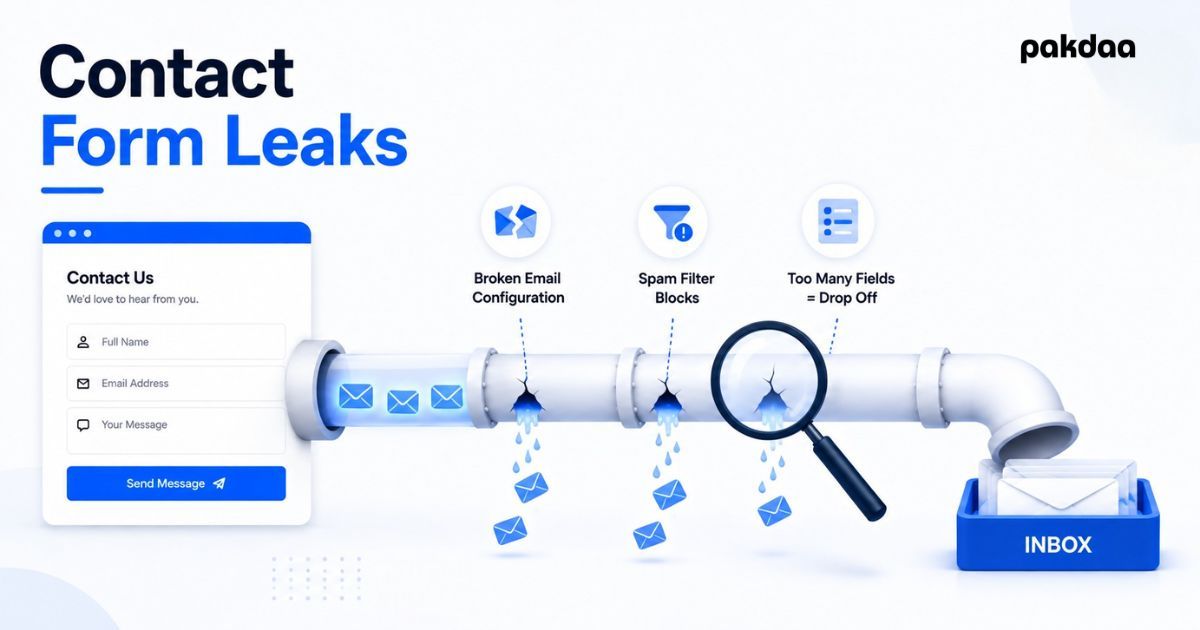
The first is technical: the form works, someone submits, and the enquiry never reaches you. The second is UX: people land on the form, start to fill it in, and give up before they submit. Different problems, different fixes. Most sites have a bit of both.
Technical causes: the form submits but leads vanish
These are the dangerous ones, because everything looks healthy on the surface.
The notification email is not sending
This is the most common cause by far. The form saves or "sends", but the notification email never leaves the server, usually because of a broken SMTP setting, an expired plugin, or a hosting change nobody flagged. The visitor sees success. Your inbox stays empty. Nothing warns you.
The alert is landing in spam
Sometimes the email does send, but your mail provider files it under junk or promotions. A shared inbox that nobody checks closely has the same effect. The lead is technically delivered and practically lost.
A plugin or form provider broke after an update
Forms often rely on a plugin or a third-party service. One update, one expired licence, or one API change can silently disable submissions or notifications. If your leads stopped on a specific date, a recent update is the first suspect.
Real enquiries are buried under spam bots
The opposite problem also loses leads. If bots flood your form, you either drown in junk and miss the real ones, or you tighten spam filtering so hard that genuine enquiries get blocked too. Both cost you sales.
UX causes: people start but never submit
Even a perfectly working form loses leads if people abandon it. Form abandonment across the web runs high, somewhere around 68% to 81% depending on the study method. Most of that is friction you can remove.
Too many fields
Every extra field costs you submissions. If you ask for phone, company, budget, and a paragraph before someone has even decided to talk to you, most will quit. Ask for the minimum you need to reply: name, one contact method, and a short message.
The form is broken or clumsy on mobile
More than half your visitors are likely on a phone. If fields are hard to tap, the keyboard covers the submit button, or the layout breaks, those leads leave. Test the form on a real phone, not just a desktop preview.
There is no clear reason to fill it in
"Contact us" is not a reason. Tell people what happens next and how fast: "Send this and we will reply within one business day with next steps." A specific promise lifts submissions.
Error handling is confusing
If the form rejects a submission without saying why, people assume it is broken and give up. Show clear inline errors next to the field, and never wipe what they already typed.
How to diagnose your contact form step by step
You do not need a developer to find the problem. Work through this in order and you will usually find the cause within an hour.
Step 1: Submit a real test entry
Fill in your own form like a customer would and hit submit. Watch whether the notification arrives, how long it takes, and where it lands. Do this from a device that is not logged into your site.
Step 2: Check spam, promotions, and every recipient inbox
Look in junk and promotions folders, and check every address the form is supposed to notify. A notification going to one unmonitored inbox is a common silent failure.
Step 3: Confirm how the form actually sends email
Find out whether the form uses your server's default mail or a proper sending service. Default server mail is the usual culprit behind missing notifications. Moving to a transactional service fixes most of these cases.
Step 4: Review anything that changed recently
If leads stopped suddenly, check for recent plugin updates, theme changes, hosting migrations, or expired licences. Line up the date leads stopped against your change log.
Step 5: Watch how real visitors use the form
Check whether people are reaching the form and abandoning it, or not reaching it at all. If many start and few finish, the problem is friction, not delivery. If almost nobody starts, the problem is the form's visibility or your traffic.
Step 6: Add a backup so this can never cost you again
Once it works, protect it. Store every submission somewhere you control and send each entry to a second live channel, so a single failure can never erase a lead. We covered exactly how to build that safety layer in our guide to the true cost of lost web leads.
The bottom line
A contact form not getting leads is almost never random. It is a broken email path, a spam problem, a bad update, or too much friction, and each one has a clear fix. Diagnose it in order, patch the cause, then add a backup so you are never guessing again. The enquiries were always coming. You just have to make sure they land.
Want us to find the leak for you?
Our team will audit your contact form and lead capture path, then show you exactly where enquiries are being lost and how to fix it. No cost, no obligation.
Get a free form audit