Most freelancers run the same contact form: name, email, message. It works, technically. But it also invites vague one-liners, tyre-kickers, and a week of clarifying emails before you even know if the project is a fit.
Your form is your front door and your first filter. A few smart additions turn it from a passive inbox into something that qualifies leads, sets expectations, and captures the context you need to reply well. It does more of the work before the first call, which for a solo operator with nobody to chase details is real time saved and better clients.
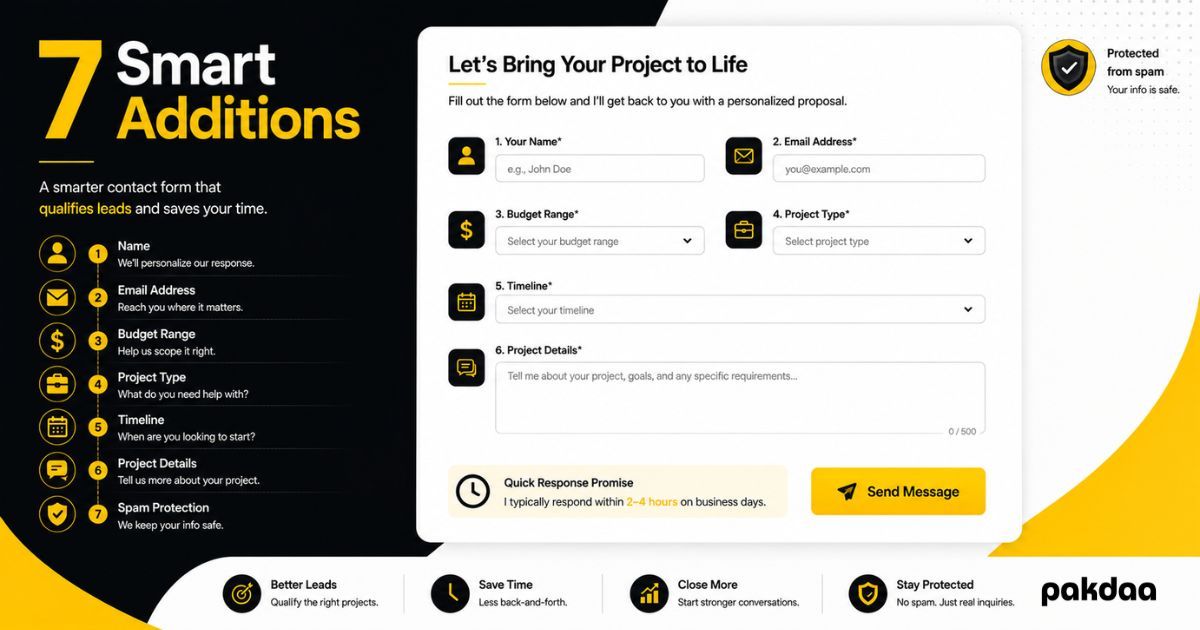
Here are seven things every freelancer should add to their client contact form. The first six are visible. The seventh is the one nobody sees but every good form needs.
1. A budget range
The most useful qualifier you can add. A simple budget range, as a dropdown so nobody has to commit to a number, tells you instantly whether a lead is in your world or wildly out of it. It feels blunt, but it saves both sides from a call that was never going to work. You can frame it gently: "Rough budget, so we can point you the right way."
2. The type of project or service
A "what do you need help with" field, even a short dropdown, tells you scope before you reply. Web design, a full build, a fix, ongoing work, these need very different responses. Knowing which lets your first reply be specific instead of "tell me more".
3. A timeline
When does the client need this done? A timeline field surfaces urgency and fit fast. A rushed two-day job and a flexible three-month project are different decisions, and knowing which one you are looking at shapes whether and how you respond.
4. A real message field, with a prompt
Keep the open message box, but prompt it. Instead of an empty "Message", label it "Tell us a bit about your project and goals". A small nudge gets you a paragraph of useful context instead of "hi, do you do websites?". Better input in means a better, faster reply out.
5. How they found you
A quick "How did you hear about us" field, or automatically capturing the source in the background, tells you which channels actually bring in clients. Over time this shows you where to spend your effort. If you would rather capture it invisibly, that is the better route, since it works even when people skip the field.
6. A clear response-time promise
This one is a feature, not a field, and it lifts submissions. Add a short line near the button: "We reply to every enquiry within one business day." It reassures people their message is not going into a void, which makes them more likely to send it. It also sets an expectation you can then beat, and speed pays: leads engaged within five minutes qualify far better than those reached after 30, per research widely cited from Harvard Business Review.
7. The invisible essentials: spam protection and stored submissions
Here is the one nobody sees, and the one that decides whether any of the above matters. Two things behind the scenes: quiet spam protection so bots do not bury real enquiries, and stored submissions so a failed notification email never loses a lead. Add a honeypot and a time check for spam, covered in our guide to protecting your contact form from spam, and make sure every submission is saved, not just emailed, as we explain in our guide to storing submissions instead of emailing them.
A form with perfect fields that silently drops leads is worse than useless, because you will not even know it is happening.
The seven at a glance
One caution: do not overload it
More fields qualify better, but too many kill submissions. Aim for a form someone can finish in under a minute. A good balance is a few short dropdowns for budget, type, and timeline, plus the prompted message, since dropdowns add almost no effort while a wall of text boxes scares people off. Add the qualifiers, but keep it quick.
The bottom line
A name-email-message form is a missed opportunity. Add a budget range, project type, timeline, a prompted message, a source field, and a response-time promise, and your form starts qualifying leads and cutting back-and-forth before you lift a finger. Back it with spam protection and stored submissions so nothing slips through. For the fuller picture, see our complete guide to contact forms for small business, and to make sure fast replies actually happen, our guide to never missing an enquiry. If you want your form built to do this, that is exactly what our team does.
Want a contact form that qualifies leads for you?
We will build you a freelancer contact form that screens budget and scope, sets expectations, and captures every lead reliably, with spam protection built in. Free to scope. button_label: Book a free form setup
Book a free form setup