Most contact forms end the same way. Someone fills one out, an email drops into a shared inbox, and nobody opens it for three hours. By then that person has already messaged two of your competitors.
Speed is the whole thing with inbound leads. A widely cited lead response study found that reaching a web lead within five minutes makes it roughly 21 times more likely to qualify than waiting just 30 minutes. The odds of even connecting fall off a cliff after the first hour. Email doesn't move at that pace. Slack and Discord do, because your team already has them open all day.
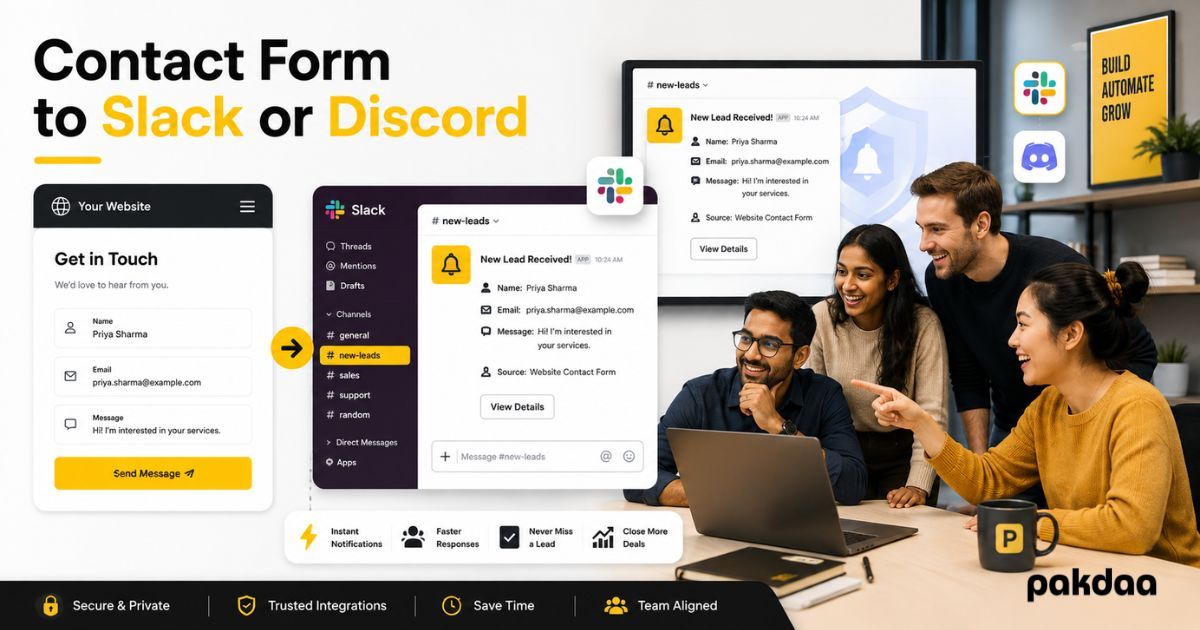
So the fix is simple. Route every form submission straight into a channel your team actually watches. It pings, someone sees it, and a reply goes out while the lead is still on your site or still thinking about you.
This post covers all three ways to set that up. One is no-code and takes about ten minutes. One is a direct webhook you control fully. One is built into some form tools already. We'll compare them, show the exact steps, and flag the mistakes that quietly break these setups.
Why a channel beats an inbox
A shared inbox is where leads go to wait. Alerts get buried under invoices and newsletters. Someone marks it read by accident. Nobody owns it, so nobody rushes.
A channel behaves differently. It notifies in real time. The whole team sees the same message. Someone can react, claim it, and reply in the same place, and you get a searchable log of every enquiry you've ever received.
There's a bonus. When a submission lands in a channel, you can wrap context around it. Tag the right salesperson. Show the UTM source. Flag a high-value enquiry with a colour or emoji. That turns a plain alert into something your team can act on without opening five tabs.
How fast is fast enough
Aim to reply within five minutes during working hours. That's the window where response rates are highest. You won't always hit it, but a channel notification gives you a real shot, where an unwatched inbox never does. Even a same-hour reply beats the industry norm, where plenty of businesses take a full day or never respond at all.
The three methods at a glance
There are three ways to connect a contact form to Slack or Discord. They trade off setup effort against control. Here's the quick view before we go deep on each.
Method 1: No-code automation tools
This is the fastest route if you'd rather not touch code. Tools like Zapier or Make sit between your form and your chat app. Your form sends the submission to them, they format it, and they post a tidy message into Slack or Discord.
The steps are broadly the same across tools:
- Pick your form as the trigger (most popular form builders are supported).
- Pick Slack or Discord as the action.
- Choose the channel the message should land in.
- Map the fields. Drop the name, email, and message into a template like:
New lead: {{name}} ({{email}}) said: {{message}}. - Test it with a real submission, then turn it on.
You can finish this in ten to fifteen minutes with no developer. The trade-offs are a monthly cost once you pass the free tier, and a short delay of a few seconds to a minute depending on your plan. For a low to medium volume of enquiries, that's usually a fair deal.
Pick this when you want it working today and you don't have a developer on hand.
Method 2: Direct webhooks
A webhook is just a URL that accepts data and posts it into a channel. No middleman, no monthly fee, and full control over how the message looks. This is our team's default when we build a custom site, because it's fast to wire up and there's nothing extra to pay for month after month.
Connecting a form to Slack with a webhook:
- In Slack, create an app in the Slack API dashboard and turn on Incoming Webhooks.
- Add a webhook to the channel you want alerts in. Slack hands you a unique URL.
- In your form's backend or handler, send a POST request to that URL with a JSON body holding the form fields.
- Format the message with the lead's name, email, and enquiry so the channel shows a clean, readable alert instead of raw data.
Slack's own Incoming Webhooks guide shows the exact payload shape and how to use Block Kit for nicer layouts.
Connecting a form to Discord with a webhook:
- Open Server Settings, then Integrations, then Webhooks, and create a new webhook on your chosen channel.
- Copy the webhook URL Discord generates for you.
- POST your form data to that URL as JSON. Discord reads the
contentfield for a plain message and supports richerembedstoo. - Style the embed with a title, the lead's details as fields, and a timestamp so it stands out in a busy server.
Discord's webhook documentation covers the embed format in detail.
The webhook route needs someone who can edit the form handler. On a custom-built site, that's a small job. On a drag-and-drop builder with no backend access, Method 1 or 3 will be easier.
Method 3: Built-in form integrations
Some form builders and CMS plugins already ship with a Slack or Discord connection. You paste a webhook URL or authorise the app in settings, pick a channel, and you're done. No automation tool, no code, no backend work.
It's the least effort of all three. The catch is control. You get whatever message format the builder decides to send, and you're tied to that tool. Great when it exists and fits your needs. Limiting the moment you want custom formatting or you switch platforms.
So which app should the form notify
Before you build anything, decide where the alert should go. The setup is nearly identical for both, so pick based on where your team already lives.
What to actually put in the notification
A bare "New form submission" ping is close to useless. The point is to let your team act without digging. Include the essentials:
- Name and email, so someone can reply straight away
- The full message or enquiry, not a truncated preview
- Which form or page it came from
- The UTM source or referrer, if you run ads
- A timestamp
Want to go further? Add a quick action. A mailto: link that opens a pre-filled reply. A mention that pings the right salesperson. A colour or emoji that flags a high-value enquiry. Small touches, big difference in how fast someone actually responds.
Common mistakes that quietly break this
The most common one is silent failure. The webhook works for a week, then a URL rotates or a channel gets deleted, and submissions vanish with no error message. Always keep a fallback: store every submission in your database or a spreadsheet too, so a broken notification never equals a lost lead.
The second is over-notifying. If every channel pings for every form, people mute it, and you're right back to the unwatched inbox problem. Send to one focused channel and keep it clean.
The third is trusting the setup blindly. Test it with a real submission after you build it, and again after any change to the site. A form that quietly stopped forwarding is worse than no form at all, because you believe it's working while leads pile up unseen.
We see that last one constantly. A business tells us their leads dried up, and the real story is the notification broke months ago and nobody checked. If you'd like a second pair of eyes on how your forms capture and route enquiries, our team runs exactly this kind of audit, and you can see the sites we've built to get a feel for how we wire it all together.
Which method should you choose
If you want it live today with no code, use a no-code tool. If you run a custom site and want zero ongoing cost with full control, use a direct webhook. If your form builder already offers the connection and the format works for you, switch it on and move on.
The method matters less than the habit. Get the lead in front of a human while they're still interested. A channel that pings will always beat an inbox that waits.
Want your website to catch every lead the moment it lands?
Book a free 20-minute call. We'll look at how your forms capture and route enquiries, and show you where leads might be slipping through.
Book a free call