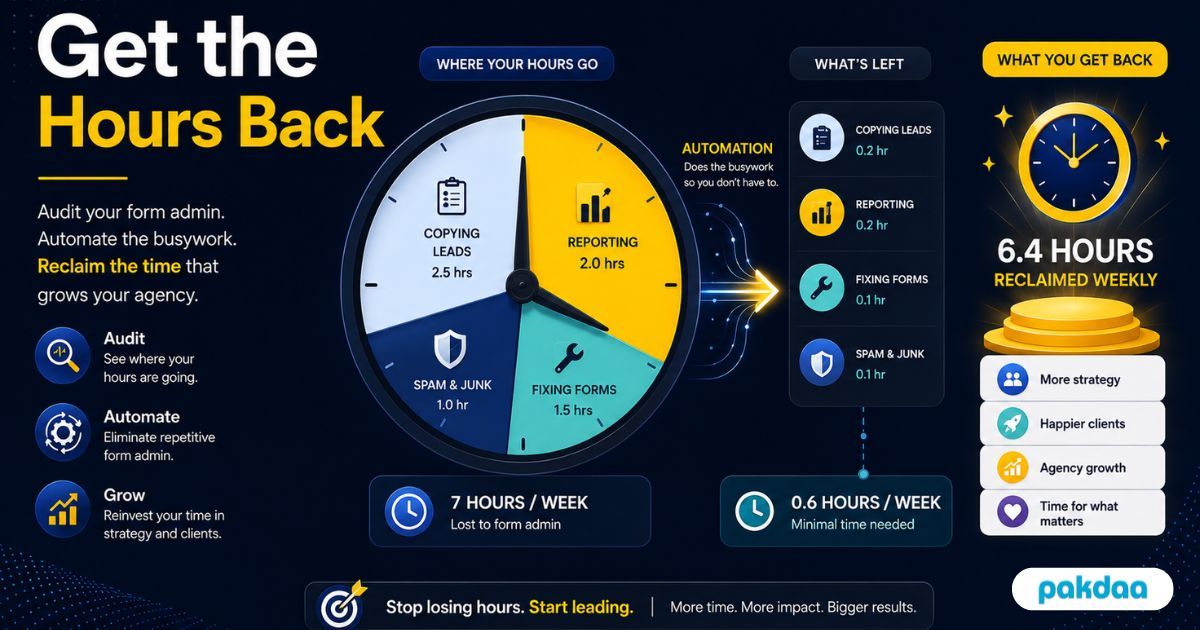
Ask an agency where its month goes and nobody says "form admin". Yet copy the leads, chase the follow-ups, build the reports, fix the broken forms, answer the "did you get my enquiry" emails, and it quietly adds up to a part-time job nobody was hired for.
The reason it never gets fixed is that the cost is invisible. It is paid in scattered ten-minute tasks, not a single bill. So this post does something different: it puts the hours on the table, task by task, and shows the specific swap that reclaims each chunk. Add them up and you can save well over 20 hours a month.
If you want the argument for why this matters, we made it in our guide to the hidden cost of managing forms manually. This is the audit.
An honest note on the numbers
The hours below are illustrative estimates for an agency running a handful of active client sites. They are not a measured fact, so treat them as a template. Plug in your own real numbers, your totals will differ, but the shape almost always holds: the biggest sinks are copying, reporting, and firefighting.
The form admin time audit
Here is where the month actually goes, and what reclaims each piece.
Copying leads into sheets or a CRM
The biggest silent sink. Every enquiry manually moved from an inbox into a sheet or CRM is minutes gone, plus the typos and skipped leads that come with it. Auto-capturing submissions on submit removes the task entirely, not just speeds it up.
Routing and chasing follow-ups
Noticing a lead, forwarding it to the right person, and remembering to follow up is a constant low-grade drain. Instant alerts to the right owner and an automatic status remove the noticing and the chasing.
Assembling client reports
Building a lead summary for each client by hand, every month, is one of the heaviest recurring costs. Live reporting or a client portal shows the same information continuously, so the monthly assembly job disappears.
Diagnosing and fixing broken forms
Across several client sites, something is usually broken, and you often find out from an angry client, then spend time diagnosing it. Monitoring that alerts you the moment a form goes quiet turns hours of investigation into a quick, quiet fix.
Answering "did you get my lead" emails
Every status-check email is an interruption and a reply. A portal where clients see their own leads answers these before they are sent, giving your team back focus time as well as clock time.
Sorting spam by hand
Wading through junk to find real enquiries wastes time and risks deleting a real lead by mistake. Quiet spam defences keep the junk out so nobody has to sort it.
Adding it up
Put those savings together and the picture is clear.
Even if your real numbers are half of these, that is still ten hours a month, more than a full working day, handed back to your team every single month.
What 20 hours a month is actually worth
Reclaimed time is not just tidier, it is capacity. Twenty hours a month is time your team can spend on billable client work, on winning new accounts, or simply not burning out. It also makes you faster: with alerts instead of manual noticing, leads get answered in minutes, and leads engaged within five minutes qualify far better than those reached after 30, per research widely cited from Harvard Business Review. So you save hours and win more of the leads you handle.
How to actually reclaim the hours
Here is the order that gives the fastest payback.
Step 1: Audit your real hours
Spend a week noting the time your team actually spends on each form task. Real numbers beat guesses and show you where to start.
Step 2: Automate capture and storage
Wire every form to save submissions automatically. This kills the biggest sink, manual copying, immediately.
Step 3: Automate routing and alerts
Send new leads to the right person instantly with a status attached, removing the noticing and chasing.
Step 4: Automate reporting
Replace hand-built monthly reports with live reporting or a client portal so the assembly job disappears.
Step 5: Add monitoring
Set up alerts for forms that break or go quiet, which cuts both the firefighting time and the status-check emails.
Step 6: Template it per client
Build the setup once and replicate it for each client, so the savings scale. The full connect layer is in our guide to automating lead management with form integration.
The catch, honestly
This is not free money. The setup takes time and some cost upfront, and the payback lands over the following weeks, not on day one. Not everything automates, judgment and the actual client conversation stay human, and you still spend a little time monitoring the automation. But the trade is heavily in your favour: a one-time build against hours reclaimed every month after.
The bottom line
The hours vanish into copying, reporting, and firefighting, quietly, every month, because nobody adds them up. Do the audit, automate capture, routing, reporting, and monitoring, and template it per client, and 20-plus hours a month come back. Spend them on billable work instead of busywork. If you want the setup built for your agency, that is exactly what our team does.
Want those 20 hours a month back?
We will audit where your form admin time goes, then automate capture, routing, reporting, and monitoring across your client sites so your team stops doing it by hand. Free to scope.
Book a free time audit